
Inbox & team
Set when WOLE hands chats to your team
The four checks WOLE runs on every answer, the confidence threshold, your own handoff rules, business hours, and what shoppers hear when a person takes over.
Updated
A handoff moves a chat from WOLE to your team. WOLE tells the shopper a person is coming, stops answering, and the chat waits under Needs human in your Inbox. A conversation is never left without a reply.
Everything here is in Settings → Handoff.
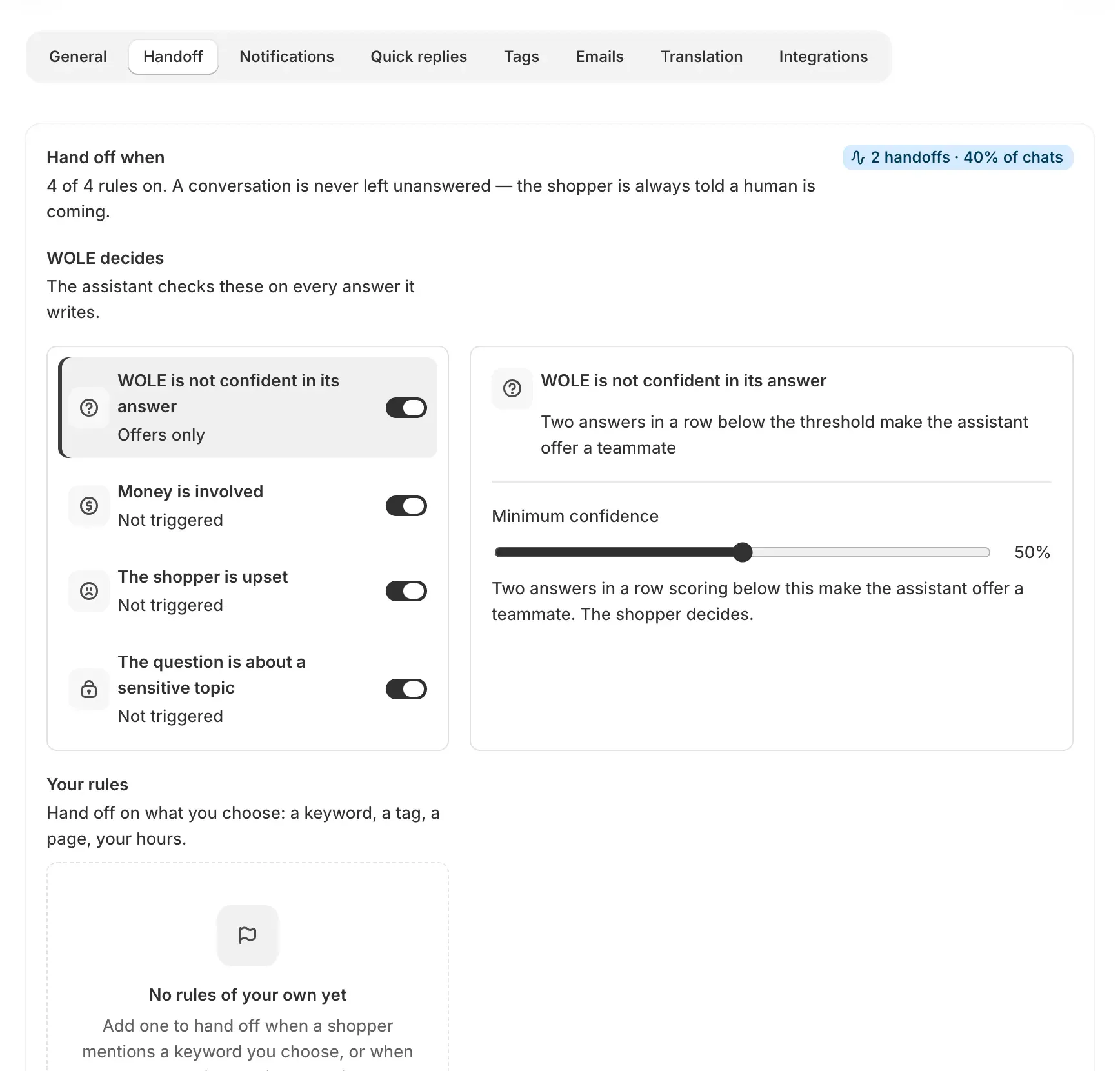
What WOLE checks on every answer
Under WOLE decides are four checks, all on to start with. Each has its own switch.
| Check | What happens when it’s on |
|---|---|
| Money is involved | Refunds, chargebacks and money the shopper has already paid go to your team. |
| The shopper is upset | An angry or frustrated shopper goes to your team. |
| The question is about a sensitive topic | WOLE judges what’s sensitive; there is no fixed list. |
| WOLE is not confident in its answer | Offers a teammate instead of handing over. The shopper decides. |
With a check off, WOLE answers that kind of question itself.
Minimum confidence sets how sure WOLE must be, 50% to start. When two answers in a row score below it, WOLE offers the shopper a teammate.
Your own rules
Your rules hand a chat over on what you choose. Click Add rule, give it a name, and add conditions under Hand off when all of these are true:
- the message contains certain words
- the page address contains something, like
/cart - the shopper has an account, or is a returning shopper
- the shopper’s language, or the channel
- the chat has reached a number of messages
- the chat carries a tag
- it’s outside your business hours
- WOLE’s confidence is below a level you set
Start from an example fills in common rules: a VIP customer, an order problem, wholesale or bulk buyers, a shopper in the cart.
Assign to sends the chat to one teammate on Growth and above; otherwise it goes to anyone. The first rule that matches wins, so put the most specific ones first. Each rule shows how many conversations it would have matched in the last 30 days.
Custom rules start on the Starter plan, which runs three. Growth runs ten, and Pro and Scale have no limit.
Business hours
Turn on Use business hours, pick your time zone and set the opening hours for each day. They decide which message the shopper gets, and the “outside business hours” condition uses them.
What the shopper is told
Under What the shopper is told are two messages, both editable:
- Inside your hours: “I’m bringing in a teammate — they’ll reply here within a few minutes.”
- Outside your hours: “I’m passing this to a teammate. We’re closed right now, so they’ll reply as soon as we’re open again.”
Use WOLE’s wording puts the original back. Shoppers writing in other languages get the message in their language.
Talk to a person
The widget’s menu always has Talk to a person, and WOLE offers it when it can’t answer. It always hands the chat over and can’t be turned off.
When credits run out
When your plan’s credits are used up, new questions go to your team the same way. See Plans and credits.
To decide who hears about a handoff, see Choose who gets notified, and how.