
The AI assistant
Products, orders and discounts in chat
How WOLE finds products and shows product cards, looks up an order for a shopper, and shares promotions or discount codes, and what it never does with them.
Updated
WOLE reads your products, orders and discounts straight from Shopify while it answers, so prices and stock are always current. You don’t sync or upload anything.
Products
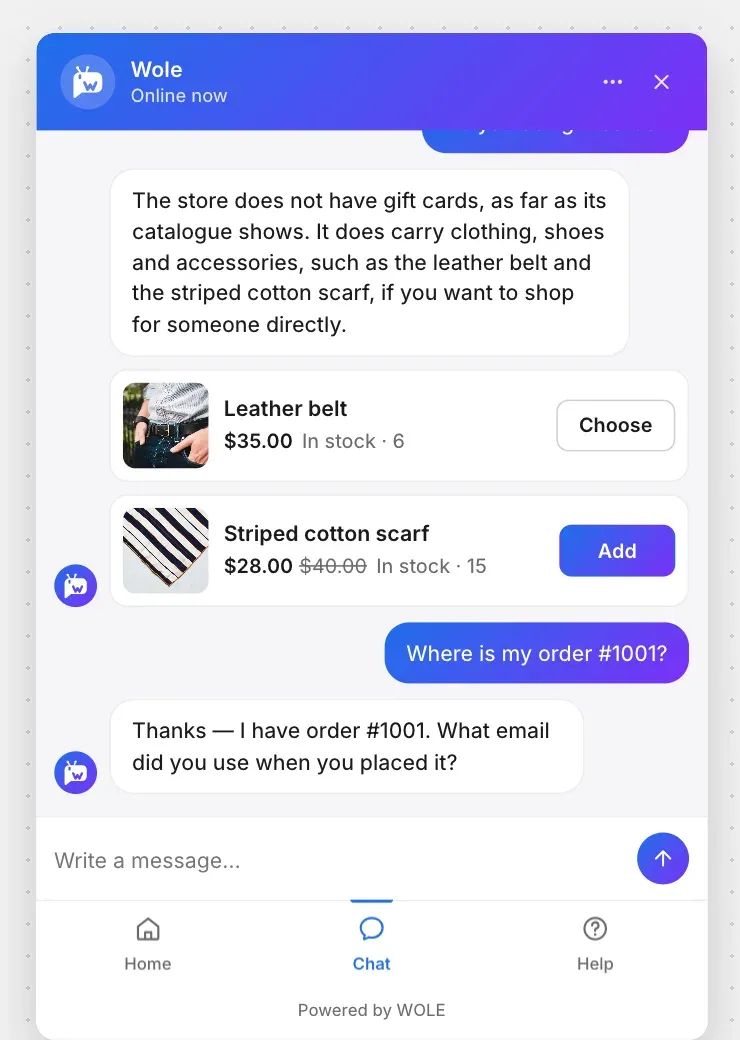
When a shopper asks about something to buy, WOLE searches your catalog and answers with product cards. Each card shows the image, the title linked to the product page, the price (with the old price struck through when it’s on sale) and whether it’s in stock. Add puts it straight into the store’s cart; Choose opens the product page when there’s a size or colour to pick.
What WOLE reads about a product:
- the title and description
- the vendor, product type and tags
- the price and sale price, and each variant’s stock
- metafields that are open to your storefront, like a fabric or a fit
Only products that are active and published to your Online Store come up. Drafts never do.
WOLE searches the way a shopper writes: “sweaters” finds “sweater”, and “merino sweater” finds “Merino knit sweater”. It also answers price questions like “anything under $50?”. When nothing matches, it says the store doesn’t have it, and offers something close instead of inventing a product. It never calls anything a best seller.
To help it find the right thing:
- Put the words shoppers use in the title, product type or tags. Tag a sofa “couch” if that’s what people ask for.
- Write sizes, materials and dimensions into the description or a metafield, not only into an image.
- For a metafield to count, give its definition Storefronts access in Shopify.
Orders
WOLE looks up an order and shows an order card with its status, the carrier and a tracking link.
- A signed-in shopper gets their own recent orders without being asked anything.
- A guest needs to give both the order number and the email used on the order. WOLE asks for whatever is missing, and a form under its question makes that easy.
It finds orders from the last 60 days. For anything older, or when nothing matches, it offers to bring in your team.
WOLE only reads orders. It can’t cancel one, change an address or refund anything. Questions about money go to your team when Money is involved is on in handoff. For questions like “can I change my order?”, write the answer in your FAQ.
The Track order block on the widget’s Home lets shoppers look up an order without typing a message. Turn Orders off in AI Training and WOLE stops looking up orders, and the block disappears.
Discounts
WOLE always knows about automatic discounts running in Shopify, and tells shoppers about them when it fits.
Discount codes are different. WOLE shares a code only when Share discount codes with shoppers is on, under Discounts in AI Training (Starter plan and above). With it off, WOLE mentions automatic promotions and never reveals a code.